
ZeroGrok Image Compressor
Compression Settings
Compression Results

Image Compression
What is image compression?
Image compression is the process of reducing digital image file sizes without significantly affecting visual quality. Our image compressor uses advanced algorithms to make your images smaller while preserving their appearance.
Why image size matters in modern web performance
Large images slow down websites dramatically. Each megabyte matters. When visitors wait more than 3 seconds for your page to load, many leave. Our image size compressor helps you meet modern speed expectations.
Lossless vs. lossy: which one is better for you?
Lossless compression reduces file size while keeping 100% of the original quality. Perfect for logos, graphics with text, or when quality is non-negotiable.
Lossy compression creates much smaller files by removing some data. For most web images, the quality difference is nearly invisible, but the size reduction is substantial.
ZeroGrok lets you choose the perfect balance between size and quality.
Why Compress Images?
Faster website loading speed
Images often make up 50-90% of a webpage’s total size. Our image optimizer instantly cuts load times, keeping visitors engaged.
Better SEO & Google ranking
Google rewards faster websites with better rankings. Compressing images directly improves your Core Web Vitals scores, boosting your SEO performance.
Reduced storage and bandwidth usage
Smaller images mean less storage space needed and lower bandwidth costs. Our pic compressor can reduce image sizes by up to 80% without visible quality loss.
Enhanced user experience
Nobody likes waiting. Faster-loading images create smoother experiences for your visitors, especially on mobile devices with limited connections.
How ZeroGrok Image Compressor Works
Step-by-step: Upload → Compress → Download
- Upload – Drag and drop your images or click to browse
- Compress – Choose your compression level and watch the magic happen
- Download – Get your optimized images instantly
Real-time compression engine overview
Our image compressor online uses cutting-edge algorithms that analyze each image and apply the perfect compression strategy. This happens in real-time, right in your browser.
Intelligent compression without quality loss
ZeroGrok’s image compressor without losing quality identifies areas where data can be safely reduced. We preserve details where they matter most while optimizing areas where compression won’t be noticed.
Advanced Features of ZeroGrok
Supports JPG, PNG, WEBP, GIF, BMP
We handle all popular image formats, giving you maximum flexibility for any project.
Batch compression (20+ images at once)
Save time by uploading multiple images simultaneously. Our batch processing makes quick work of even large image collections.
Resize & convert formats during compression
Change dimensions and file formats in one step. Convert from PNG to JPG, JPG to WebP, or resize images while compressing.
Drag & drop interface
Simply drag your images directly into the browser. No complex menus or confusing options.
Auto file optimization with smart presets
Let ZeroGrok choose the best compression settings automatically based on image content and type.
No login or registration required
Start compressing immediately. No accounts, no passwords, no hassle.
Instant preview before download
Compare before and after versions to ensure you’re happy with the results.
Benefits of Using ZeroGrok
Blazing fast image compression
Our optimized algorithms compress most images in under 2 seconds.
100% free, unlimited usage
No hidden fees, no surprise charges, no credit card required. Compress as many images as you need.
Maintains image clarity and sharpness
Our compression preserves the details that matter while removing unnecessary data.
Clean, ad-free experience
Focus on your work without distracting popups or banner ads.
Works on desktop and mobile
Compress images anywhere, on any device with a web browser.
No watermark, no hidden charges
Your images remain 100% yours. No watermarks or branding added.
Use Cases: Who Should Use ZeroGrok?
Web designers & developers
Create faster-loading websites without sacrificing visual quality.
Digital marketers & SEO experts
Improve page speed scores and search rankings with properly optimized images.
Bloggers & content creators
Make your content load faster while using less storage space.
Ecommerce store owners
Speed up product pages and reduce bounce rates with optimized product images.
App developers & UI designers
Reduce app size and improve performance with smaller image assets.
Batch Compression & Resize Tools
Upload multiple images at once
Process your entire image library in one go. Save hours of manual work.
Choose compression level (Low, Medium, High)
Select the perfect balance between file size and visual quality for your needs.
Resize images by % or pixel dimensions
Scale images to exact dimensions or by percentage while compressing.
Convert Image Formats While Compressing
JPG to WEBP, PNG to JPG, etc.
Transform between formats with a single click while compressing.
Reduce format size with minimal quality loss
Some formats work better for certain images. We help you choose the most efficient option.
Great for web optimization
Convert to modern formats like WebP for maximum web performance.
ZeroGrok vs. Other Image Compressors
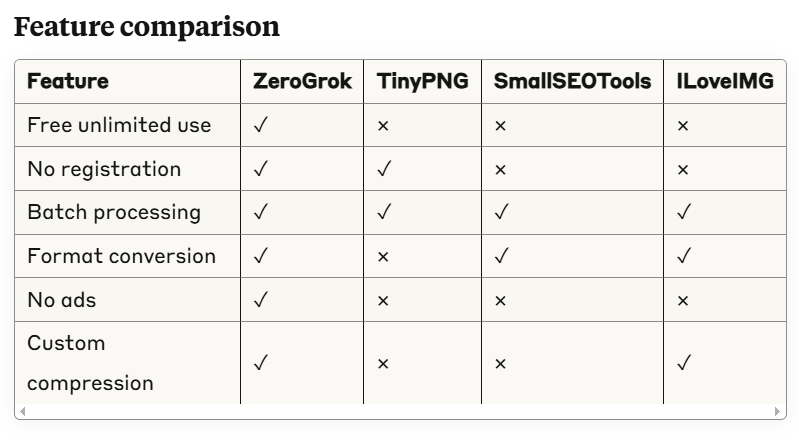
Why ZeroGrok offers better UX, speed, and control
Our clean interface focuses on what matters: your images. We skip the clutter and deliver faster results with more control over the compression process.
No ads, no signup, just performance
We believe in putting users first. You get powerful compression tools without the annoyances.
Best Practices for Image Compression
When to use lossy vs. lossless
Use lossless for graphics, logos, screenshots, and images with text.
Use lossy for photographs, product images, and backgrounds where minor quality changes won’t be noticed.
Optimizing images for Core Web Vitals
Properly sized and compressed images directly improve LCP (Largest Contentful Paint) scores, a key Google ranking factor.
Choosing the right file type for the job
JPG: Best for photographs and complex images with many colors. PNG: Ideal for graphics with transparency or limited colors. WebP: Modern format with smaller sizes for both photos and graphics. SVG: Perfect for logos and simple graphics that need to scale.
SEO & Performance Benefits
Improve Google PageSpeed Insights score
Image optimization directly impacts your PageSpeed score. Better scores mean better rankings.
Lower bounce rate with faster-loading pages
Users stay longer on sites that load quickly. Compressed images help keep visitors engaged.
Help with mobile-first indexing
Mobile users often have slower connections. Our image optimizer ensures your site performs well on all devices.
Better UX = better conversions
Faster sites convert better. Studies show that each second of load time can reduce conversions by 7%.
Content Security & File Privacy at ZeroGrok
All files auto-deleted after compression
Your images are automatically removed from our servers after processing. Nothing is stored long-term.
HTTPS secured upload & download
All transfers are encrypted and secure. Your images remain private.
GDPR-compliant, no data storage
We follow strict privacy standards and don’t collect or store your image data.
FAQs About ZeroGrok and Image Compression
Is ZeroGrok free to use?
Yes, ZeroGrok is 100% free to use with no hidden charges or limits.
Will my image quality be reduced?
With lossless compression, there’s no visible quality loss. With lossy compression, we balance size reduction and quality preservation intelligently.
Do I need to create an account?
No. ZeroGrok works instantly without registration or login.
What browsers/devices are supported?
ZeroGrok works on all modern browsers including Chrome, Firefox, Safari, and Edge, on both desktop and mobile devices.
Start Compressing with ZeroGrok Today
Try it now — no signup, no waiting. Compress images in seconds and boost your site performance.